
News 
Proteax 3.3 2023-03 is now released; adding Residue Extension support - Proteax for Spreadsheets and Proteax Core.
Proteax 3.2 2022-09 is now released; a patch for a bug in the list() function - Proteax for Spreadsheets and Proteax Core.
Proteax 3.2 is now released - Proteax for Spreadsheets and Proteax Core.
Proteax 3.1 is now released - Proteax for Spreadsheets and Proteax Core.
Proteax 3.0 is now released - Proteax for Spreadsheets and Proteax Core. Happy New Year!
Final beta of Proteax 3.0 for Spreadsheets and Proteax Core is now available for download.
Beta 2 of Proteax 3.0 is now available for download. Proteax Core 3.0 is also available now (stand-alone version of Proteax for command-line usage and custom applications).
Beta 1 of Proteax 3.0 is now available for download.
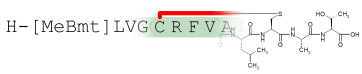
An early preview of Proteax 3.0 is now available for download. Supports arbitrarily crosslinked peptides.
Proteax® - protein analogs made easy
Biochemfusion's Proteax software suite makes it easy to handle modified proteins and protein derivatives. Use Proteax with Microsoft® Excel® or Oracle® databases to register and analyse your protein structures.
The chemically-aware Proteax engine enables you to work with post-translationally and chemically modified protein sequences. Protein data can therefore be transferred directly to bioinformatics tools, chemistry tools and to and from mass spectrometry instruments.
On the webTry a fully interactive browser-based protein editor at the Proteax demo site. Peptides and proteins can be visualized with Biochemfusion rendering components that are available over the full range of current web technologies: HTML5 + JavaScript, .NET, Java applets, and Flash. |
![[Image: Proteax - easily integrated on web pages.]](env_web.png "Proteax - easily integrated on web pages.")
|
![[Image: Proteax for Spreadsheets - protein chemistry in MS Excel or OpenOffice.org Calc.]](env_spreadsheet.png "Proteax for Spreadsheets - protein chemistry in MS Excel or OpenOffice.org Calc.")
|
In the officeThe Proteax for Spreadsheets add-ins work in both Microsoft Excel and OpenOffice.org® Calc so you can process offline and local data within a familiar spreadsheet environment.
|
In the corporate databaseProteax Cartridge integrates directly into your Oracle or PostgreSQL® database. It does so without imposing restrictions on how you model your data.
Proteax uses native database engine functional indexing to ensure an optimal and smooth integration. |
![[Image: Proteax Cartridge - protein chemistry for databases.]](env_db.png "Proteax Cartridge - protein chemistry for databases.")
|
![[Image: Proteax for KNIME.]](env_knime.png "Proteax for KNIME.")
|
For productive automationWith the Proteax KNIME™ nodes end users are able to graphically setup and automate workflows related to the registration and analysis of biopharmaceuticals. |
For power users and developersProteax Core is the raw Proteax toolkit with language bindings to .NET, Python, Pascal, Java, and C/C++.
Well-suited for developers and power users used to scripting. Maximum performance and flexibility. |
![[Image: Proteax Core can be used from a large range of programming languages.]](env_desktop.png "Proteax Core can be used from a large range of programming languages.")
|
Proteax key features
- Add post-translational modifications and chemical features to your protein sequences.
- Convert chemical structures into protein sequences for easy comparison and better visualization.
- Generate trivial derivative names or generate derivatives from names through DerNot expressions.
- Export and import proteins in GPMAW (a product of Lighthouse Data) format for mass spectrometry analysis.
- Enforce sequence and structural identity checks on protein registrations.
- View protein sequences as chemical entities and register them in chemistry databases.
Industry standard formats
Proteax supports industry standard protein and chemistry formats. Proteins can be processed in
Chemical structures are generated in MDL molfile format so you can easily interface to standard chemistry tools.
Learn more
Try the fully functional trial version of Proteax for Spreadsheets. For more product details on both Proteax for Spreadsheets and Proteax Cartridge you can download the product flyers. You are also very welcome to contact .
Proteax Live
![[Image: Biochemfusion demo client screenshot.]](demo_screenshot.png "Biochemfusion demo client screenshot.")
Take a tour at the demo site to see Proteax in action.
Proteax for Spreadsheets
![[Image: Proteax for Spreadsheets screenshot.]](proteax_for_spreadsheets_screenshot.png "Proteax for Spreadsheets screenshot.")
Learn more about Proteax for Spreadsheets - protein chemistry for Microsoft Excel and OpenOffice.org Calc.
Download a fully functional trial version of Proteax for Spreadsheets today.
e-mail: -
Phone: +45 30 48 00 50 - Copenhagen, Denmark
© 2008 - 2023 Biochemfusion Holding ApS. All rights reserved.
Oracle® is a registered trademark of Oracle corp. and its affiliates - Java® is a registered trademark of Oracle corp. and its affiliates - JavaScript™ is a registered trademark of Oracle corp. and its affiliates - Excel® is a registered trademark of Microsoft corp. and its affiliates - Flash® is a registered trademark of Adobe Systems Incorporated in the United States and/or other countries. - MDL® is a registered trademark of Symyx Technologies (now Accelrys) - OpenOffice.org® is a registered trademark of The OpenOffice.org project - PostgreSQL® is a registered trademark of PostgreSQL, Inc. - KNIME™ is a registered trademark of KNIME.com GmbH - Proteax® is a registered trademark of Biochemfusion Holding ApS